Dependency Injection and IoC
This is also a way to achieve decoupling.
Core Concepts
DIP (Dependency Inversion Principle): High-level modules should not depend on low-level modules; both should depend on abstractions (interfaces or abstract classes). Abstractions should not depend on details; details should depend on abstractions.
IoC (Inversion of Control): Instead of a class creating its own dependencies via
new, those dependencies are provided externally — control is inverted.Dependency Injection (DI): A way to implement IoC — dependencies are injected into the consumer (via constructor injection, property/field injection, or method injection).
Why Use It (Advantages)
- Easier to test (can swap in mock or fake implementations)
- Reduces coupling, improves maintainability and scalability
- Clearer dependency boundaries and lifecycle management (especially with DI frameworks)
Common Implementation Approaches & Examples
1) Manual Dependency Injection (Simple, for small projects / testing)
Idea: Pass dependencies via constructor (constructor injection). It’s straightforward and great for unit testing.
// Interface and implementation
interface UserRepository {
    fun getUser(id: String): User
}

class UserRepositoryImpl(private val api: UserApi) : UserRepository {
    override fun getUser(id: String) = api.fetch(id)
}

// Consumer (ViewModel)
class UserViewModel(private val userRepository: UserRepository) : ViewModel() {
    fun load(id: String) { /* use userRepository */ }
}

// Assemble dependencies manually
class MyApplication : Application() {
    val userApi by lazy { UserApi() }
    val userRepository by lazy { UserRepositoryImpl(userApi) }
}

class MainActivity : AppCompatActivity() {
    private lateinit var viewModel: UserViewModel
    override fun onCreate(savedInstanceState: Bundle?) {
        super.onCreate(savedInstanceState)
        val repo = (application as MyApplication).userRepository
        viewModel = UserViewModel(repo) // Injected here
    }
}- Pros: Simple, explicit, easy to understand
- Cons: In complex object graphs or with scope management, it becomes verbose (too many
by lazy/ factories)
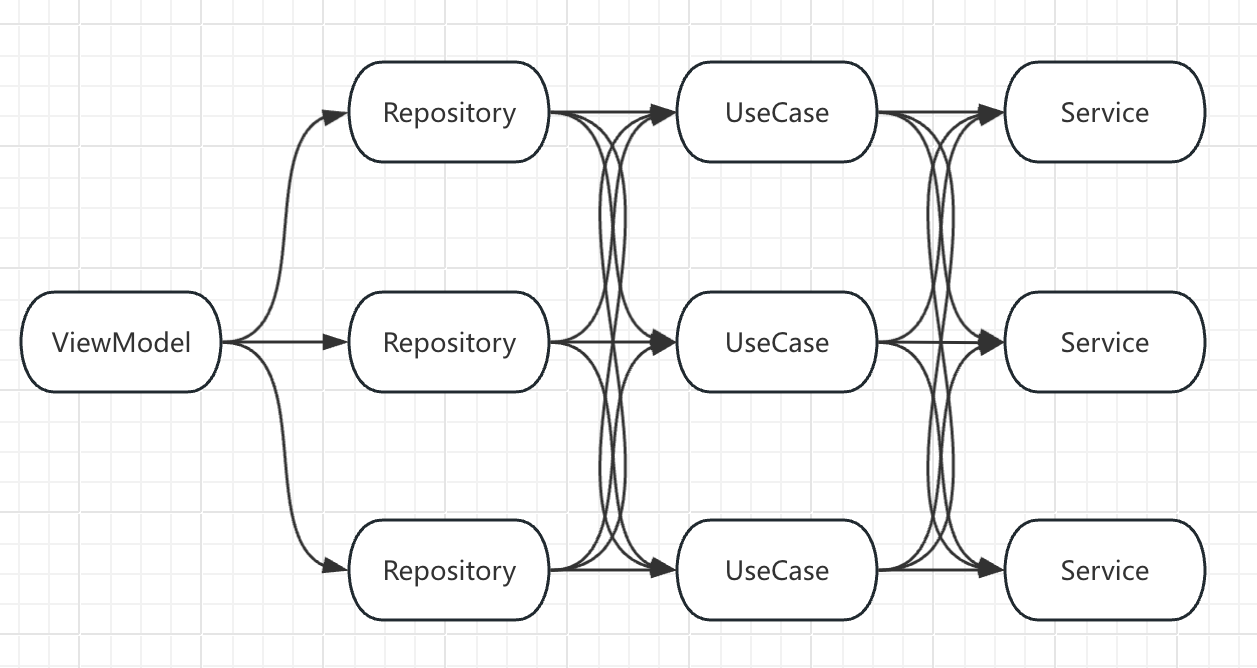
Google illustrates this with an analogy: When you create a car, you must provide its engine, tires, etc. But the engine itself may depend on other parts — how deep does the nesting go? In Android MVVM, the ViewModel might depend on a Repository, which depends on a UseCase, which depends on a Service:
class HomefeedViewModel(private val repo: HomefeedRepo)
class HomefeedRepo(private val useCase: HomefeedUseCase)
class HomefeedUseCase(private val service: HomefeedService)
class HomefeedService

class HomefeedViewModelFactory(
    private val homefeedRepo: HomefeedRepo,
) : ViewModelProvider.Factory {
    override fun <T : ViewModel> create(modelClass: Class<T>): T {
        if (modelClass.isAssignableFrom(HomefeedViewModel::class.java)) {
            @Suppress("UNCHECKED_CAST")
            return HomefeedViewModel(homefeedRepo) as T
        }
        throw IllegalArgumentException("Unknown ViewModel class")
    }
}
Creating the ViewModel:
// Deeply nested "new" calls — complex and hard to maintain
val homefeedRepo = HomefeedRepo(HomefeedUseCase(HomefeedService()))
val factory = HomefeedViewModelFactory(homefeedRepo)
val viewModel = ViewModelProvider(this, factory)[HomefeedViewModel::class.java]
2) Service Locator (Factory / Registry) — ⚠️ Controversial Pattern
Idea: Use a global registry to store and retrieve dependencies. Simplifies setup but hides dependencies (hurts testability and clarity).
object ServiceLocator {
    private val singletons = mutableMapOf<Class<*>, Any>()
    fun <T : Any> register(clazz: Class<T>, impl: T) { singletons[clazz] = impl }
    @Suppress("UNCHECKED_CAST")
    fun <T> get(clazz: Class<T>) = singletons[clazz] as T
}

// Initialization (Application)
class MyApp : Application() {
    override fun onCreate() {
        super.onCreate()
        ServiceLocator.register(UserRepository::class.java, UserRepositoryImpl(UserApi()))
    }
}

// Usage
class SomeClass {
    private val repo: UserRepository = ServiceLocator.get(UserRepository::class.java)
}Note: Service Locator hides dependencies and introduces global state — generally not recommended.
3) Dagger / Hilt (Google Recommended for Medium–Large Projects)
Why: Compile-time injection, excellent performance, lifecycle-aware (Hilt). Most widely used in production Android apps.
Gradle (simplified):
implementation "com.google.dagger:hilt-android:2.x"
kapt "com.google.dagger:hilt-android-compiler:2.x"Example:
@HiltAndroidApp
class MyApplication : Application()

interface UserRepository { fun getUser(id: String): User }

class UserRepositoryImpl @Inject constructor(
    private val api: UserApi
): UserRepository {
    override fun getUser(id: String) = api.fetch(id)
}

@Module
@InstallIn(SingletonComponent::class)
object NetworkModule {
    @Provides @Singleton
    fun provideUserApi(): UserApi = UserApi()

    @Provides @Singleton
    fun provideUserRepository(api: UserApi): UserRepository =
        UserRepositoryImpl(api)
}

@HiltViewModel
class UserViewModel @Inject constructor(
    private val repo: UserRepository
) : ViewModel()

@AndroidEntryPoint
class MainActivity : AppCompatActivity() {
    private val vm: UserViewModel by viewModels()
}
Key points:
@HiltAndroidApp: bootstraps Hilt@Module+@Providesor@Binds: provide dependencies@InstallIn: defines the scope (Singleton, Activity, ViewModel, etc.)- Constructor injection with
@Injectis preferred
4) Lightweight Container: Koin (Kotlin DSL, Runtime Injection)
Idea: Use Kotlin DSL to declare dependencies and load them at runtime. Simple and readable — great for small/medium projects.
val appModule = module {
    single { UserApi() }
    single<UserRepository> { UserRepositoryImpl(get()) }
    viewModel { UserViewModel(get()) }
}

class MyApplication : Application() {
    override fun onCreate() {
        super.onCreate()
        startKoin {
            androidContext(this@MyApplication)
            modules(appModule)
        }
    }
}

class MainActivity : AppCompatActivity() {
    private val vm: UserViewModel by viewModel()
}Pros: Simple, readable, quick to set up Cons: Runtime resolution overhead, less strict than Dagger/Hilt in large projects
How DIP Appears in Code
- Define dependencies via interfaces (
interface UserRepository) - Bind implementations to interfaces externally (e.g., module or factory)
- Inject via constructors (
class UserViewModel(private val repo: UserRepository))
→ High-level modules depend on abstractions, not concrete implementations.
Comparison of Injection Methods (Preferred Order)
- Constructor Injection ✅ — explicit, testable, and framework-friendly
- Property/Field Injection — acceptable in Activities/Fragments (used by Hilt)
- Method Injection — for special delayed injection cases
- Service Locator 🚫 — implicit, not test-friendly
Testing Strategies
- Provide fake/mock implementations for interfaces
- Replace modules in tests (Hilt:
@TestInstallIn; Koin: load test modules)
Practical Recommendations
| Project Type | Recommended Approach |
|---|---|
| Small app / POC / learning | Manual DI or Koin |
| Medium–large / production | Hilt (or Dagger) |
| Performance critical / strict compile-time safety | Dagger or Hilt |
| Avoid | Manual new inside dependent classes (breaks DIP) |
Quick Checklist
- Do you use interfaces to abstract key dependencies? ✅
- Are dependencies exposed via constructor parameters? ✅
- Are scopes managed (Singleton, Activity, ViewModel)? ✅
- Are fake/test modules available for testing? ✅