Kotlin Basics (Kotlin on the JVM)
- Kotlin: from beginner to “forget it”
- A progressively learn-as-you-go language
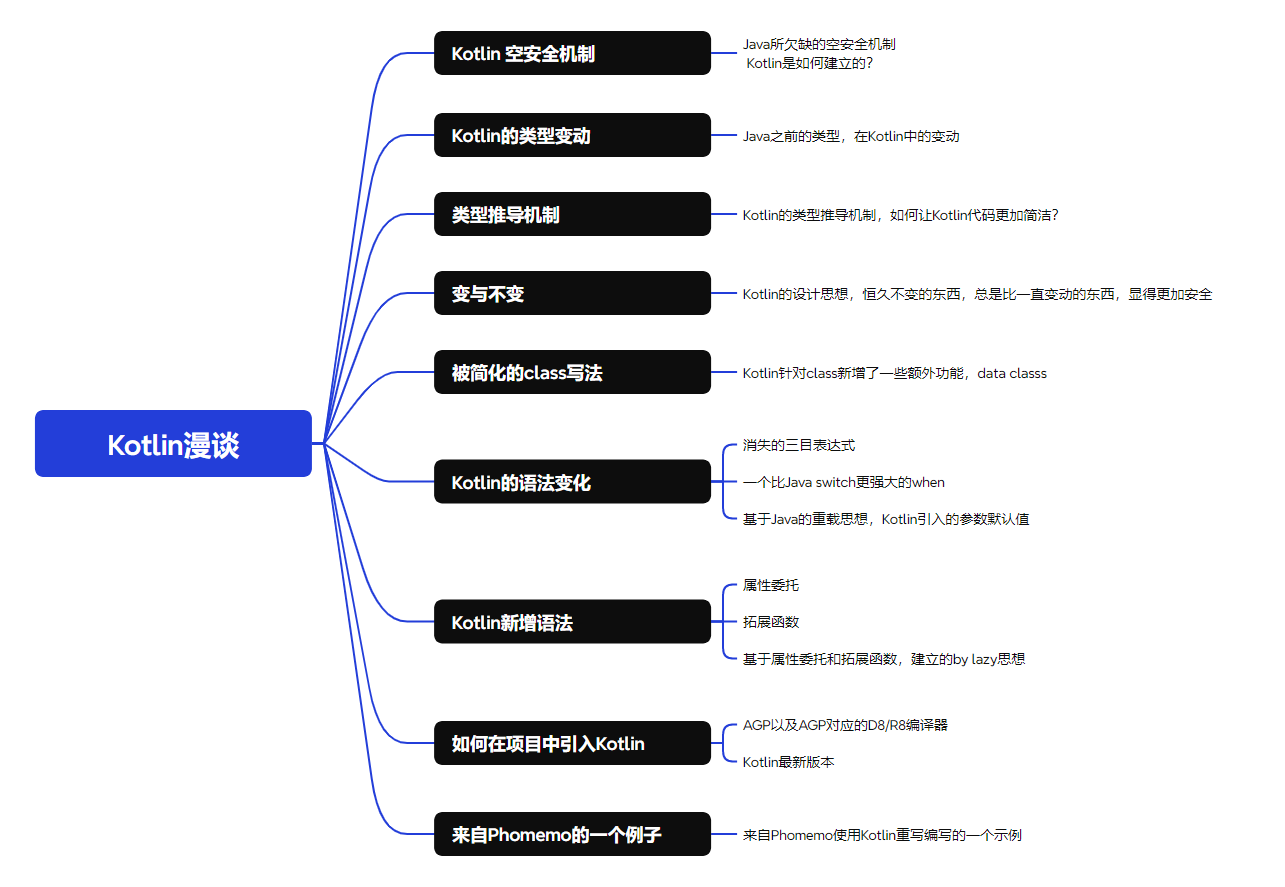
1. Null Safety Mechanism
In Kotlin, null safety is enforced at the syntax level by using the question mark (?).
// This is a String? type
user?.email
user?.name
In Java, null is treated as a possible value for all reference types. Example:
class User {
    private String id;
    private String password;

    public User(String id, String password) {
        this.id = id;
        this.password = password;
    }

    public String getId() {
        return this.id;
    }

    public String getPassword() {
        return this.password;
    }
}// psvm
User user = new User("id", null);
// In this case, both id and password can potentially be null
String id = user.getId();
String password = user.getPassword();
// Handling nulls
if (id != null) {
id.function();
} else {
System.out.println("id is null");
}
if (password != null) {
password.function();
} else {
System.out.println("password is null");
}In Java, null is part of the type system by default, so developers must manually handle possible null values. If not handled, you easily get a NullPointerException (NPE) at runtime:
id.function(); // Throws NullPointerException if id == nullIn Kotlin, null is not part of the type by default — variables cannot hold null values unless explicitly declared as nullable.
If a variable could be null, it must be declared with ?. The compiler enforces null checks at compile time, not runtime.
data class User(
    val id: String,
    val password: String?
)

val user = User("id", null)

user.id.function() // Safe, id is non-null
user.password?.function() // Safe call

// Forcing non-null access (throws if null)
user.password!!.function()

// Safe handling with let and run
user.password?.let {
    it.function()
} ?: run {
    println("password is null")
}- Kotlin catches potential null errors at compile time instead of runtime.
- However, null safety cannot prevent issues caused by memory leaks or lifecycle mismanagement (e.g., Android View destroyed before callback).
Example:
interface ICallback {
    fun callback(message: String)
}

class View : ICallback {
    private val presenter: Presenter = Presenter(this)

    override fun onViewCreated() {
        presenter.fetchData()
    }

    override fun callback(message: String) {
        mBinding.tvInfo.text = message
    }
}

class Presenter(
    val iCallback: ICallback,
) {
    fun fetchData() {
        Single.create<String> { emitter ->
            Thread.sleep(2000L) // Simulate network call
            emitter.onSuccess("Hello World")
        }.subscribeOn(Schedulers.io())
         .observeOn(AndroidSchedulers.mainThread())
         .subscribe(
            { result -> iCallback.callback(result) },
            { }
         )
    }
}
If the View is destroyed before the network request completes, iCallback may become null — something the Kotlin compiler cannot prevent.
2. Kotlin Type Conversion
- Primitive types
1. Java boolean -> Kotlin Boolean
2. Java int -> Kotlin Int
3. Java float -> Kotlin Float

- Boxed types
1. Java Boolean -> Kotlin Boolean?
2. Java Integer -> Kotlin Int?
3. Java Float -> Kotlin Float?
3. Type Inference
Java (up to 1.8) doesn’t support full type inference:
final List<String> list = new ArrayList<>();
final String word = "Good Morning! I am the best handsome boy in QUIN~~~";
final boolean doIHandsome = true;
You must always explicitly declare types.
In Kotlin, the compiler infers the type automatically:
val bannerType = adverts.getBannerType()Kotlin’s type inference happens only once at initialization. It’s still a statically typed language — unlike Python or JavaScript.
# Python (dynamic)
word = "I am Python"
word = 10
word = False # No error// Kotlin (static)
var word = "I am Kotlin"
word = 10 // Error
word = false // Error4. Mutable vs Immutable
- Java defaults to mutable
- Kotlin defaults to immutable
In Java, forgetting to mark things as final can lead to unwanted modification or inheritance.
In Kotlin:
- Classes are final by default (cannot be inherited)
- Variables are immutable by default (
val)
// This will cause an error
class Aimo

class Quin: Aimo // ❌ Error, Aimo must be open or abstract
Correct usage:
open class Aimo
abstract class Aimo
For variables:
var keyword = "Mutable"
keyword = "Changed" // ✅ Allowed

val keyword = "Immutable"
keyword = "Changed" // ❌ Not allowed
This encourages safer, more predictable code.
5. Simplified Class Declaration
Kotlin’s data class replaces verbose Java beans.
public class User {
    private final String userId;
    private final String password;
    private final int age;

    public User(String userId, String password, int age) {
        this.userId = userId;
        this.password = password;
        this.age = age;
    }

    public String getUserId() { return userId; }
    public String getPassword() { return password; }
    public int getAge() { return age; }
}
Kotlin equivalent:
data class User(
    val userId: String,
    val password: String,
    val age: Int
)
Copy Function
data class automatically provides a copy() function for cloning and modifying fields.
6. Syntax Changes
6.1 Ternary Operator Removed
view.setVisibility(showOrHide ? View.VISIBLE : View.GONE);view.visibility = if (showOrHide) View.VISIBLE else View.GONE6.2 when — Enhanced switch
Supports ranges and complex conditions:
when (Calendar.getInstance().get(Calendar.HOUR_OF_DAY)) {
    in 6..11 -> TimeStage.Morning()
    in 12..17 -> TimeStage.Afternoon()
    in 18..19 -> TimeStage.Nightfall()
    in 20..23 -> TimeStage.Evening()
    else -> TimeStage.Midnight()
}
6.3 Default Parameters Replace Overloads
public void setViewParams(Params params) {
    setViewParams(params, 0f);
}

public void setViewParams(Params params, float bias) {
    this.setParams(params);
    this.setBias(bias);
}fun setViewParams(params: Params, bias: Float = 0f) {
setParams(params)
setBias(bias)
}7. New Kotlin Features
7.1 Delegation with by
Java requires verbose delegation:
public class SuperSource implements ISource {
    private final NormalSource normalSource = new NormalSource();

    @Override public String fetchA() { return normalSource.fetchA(); }
    @Override public String fetchB() { return "Super B"; }
}
Kotlin simplifies it:
class SuperSource(normalSource: NormalSource = NormalSource()): ISource by normalSource {
    override fun fetchB(): String = "Super B"
}
7.2 Extension Functions
Add methods to existing classes:
fun String.log(tag: String) {
    Log.d(tag, this)
}
7.3 Infix Functions
infix fun Int.add(other: Int): Int = this + other

3 add 5
Or for custom classes:
data class Person(val age: Int)

infix fun Person.and(other: Person) = this.age + other.age
infix fun Person.averageAge(other: Person) = (this.age + other.age) / 2f
7.4 by lazy
Lazily initialize properties only when used:
class DataSource {
    private val calendar: Calendar by lazy {
        Calendar.getInstance()
    }

    fun fetchDate(): Date = calendar.time
}
calendar initializes only when fetchDate() is first called.
Internally implemented with synchronization to ensure thread safety.
8. A Practical Example from Phomemo
A Java class full of repetitive null checks:
(~140 lines of code omitted for brevity)
Converted to Kotlin, it becomes much cleaner:
class PremiumMineHeadFragmentByKt: BaseMemberMineHeadFragment<PremiumMineHeadFragmentBinding>() {
    override fun getTvMileage(): TextView? = mBinding?.tvMileage
    override fun getCTASubscription(): View? = mBinding?.ctaVipSubscribe
    ...
}
Even abstract classes become simpler:
abstract class BaseMemberMineHeadFragmentKt<B: ViewBinding>: MainToolbarFragment<B>() {
    abstract val ctaSubscription: View?

    private fun initEvent() {
        ctaSubscription?.setOnClickListener {
            ViewUtil.avoidFastClick(it)
            navigateToPaymentSubMember()
        }
    }
}
✅ Summary
- Kotlin moves null safety to compile time
- Reduces verbosity with type inference and data classes
- Encourages immutability and safe inheritance
- Introduces modern patterns like delegation, extensions, and lazy initialization
- Provides concise, readable, and safer code compared to Java